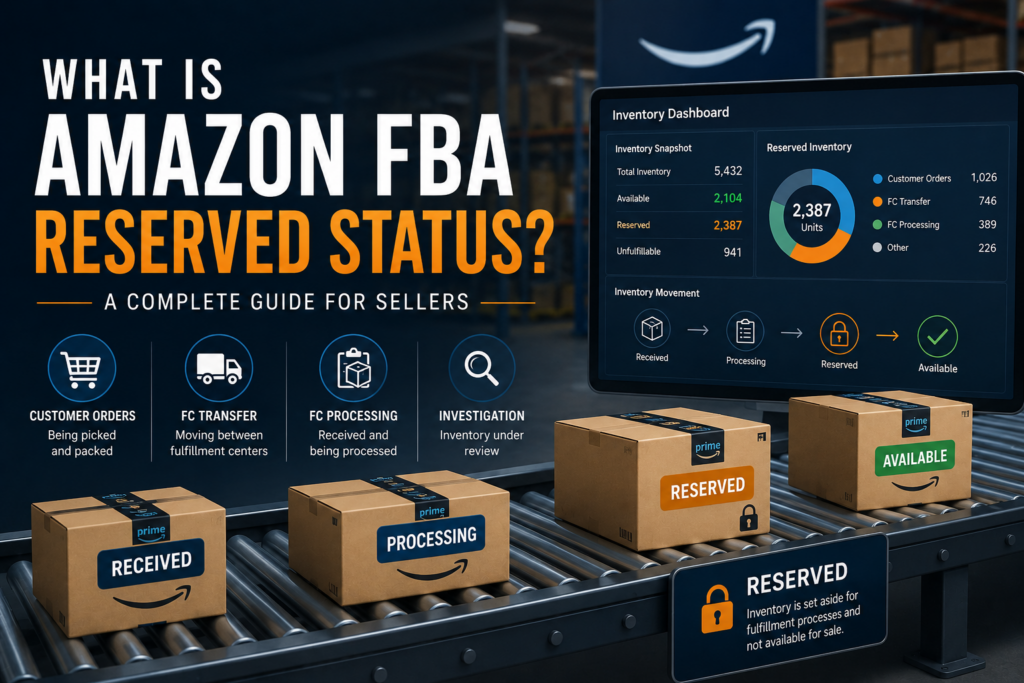
What Is Amazon FBA Reserved Status?
One of the most confusing inventory statuses in Amazon Seller Central is Reserved.
You log into your inventory dashboard expecting to see products available for sale, only to find dozens—or even hundreds—of units sitting in Reserved inventory. It can be frustrating, especially if you’re trying to understand why your available inventory is lower than expected.
The good news is that Reserved inventory is completely normal in most situations.
At Ecomergize, we regularly help brands investigate inventory discrepancies, and Reserved inventory is one of the most common questions we receive. Here’s what it means, why it happens, and when you should actually be concerned.
What Does Reserved Inventory Mean?
Reserved inventory refers to units that Amazon temporarily removes from available inventory because they’re being used in another fulfillment process.
Although these units physically exist inside Amazon’s fulfillment network, they cannot currently be purchased by customers.
Think of Reserved inventory as products that are “busy.”
They’re still yours—they’re simply unavailable while Amazon completes another task.
Why Does Amazon Reserve Inventory?
Amazon reserves inventory for several different operational reasons.
The most common include:
- Customer orders being picked and packed
- Inventory moving between fulfillment centers
- Products waiting to be processed after arriving
- Units being inspected or investigated
- Inventory allocated to customer orders
Each of these scenarios temporarily removes inventory from the Available count until the process is complete.
The Different Types of Amazon Reserved Inventory
Not all Reserved inventory is created equal.
Amazon breaks Reserved inventory into several categories, each representing a different stage of the fulfillment process.
1. Customer Orders
This is the healthiest type of Reserved inventory.
A customer has already purchased your product, and Amazon has reserved the unit while it prepares the shipment.
The inventory is no longer available because it’s already been sold.
You’ll typically see these units move from:
Available → Reserved → Shipped
No action is required.
2. FC Transfer
FC Transfer stands for Fulfillment Center Transfer.
Amazon constantly moves inventory between warehouses to position products closer to future customers.
For example:
You send inventory into a fulfillment center in California.
Amazon may decide to redistribute part of that inventory to Texas, Illinois, or Florida based on expected customer demand.
While those products are traveling between facilities, they’ll appear as Reserved.
This is one of the most common reasons sellers see large Reserved inventory counts.
3. FC Processing
After inventory arrives at an Amazon fulfillment center, it doesn’t instantly become available for purchase.
Instead, Amazon must:
- Receive the shipment
- Verify quantities
- Scan barcodes
- Store products
- Update inventory records
During this process, inventory is often classified as FC Processing.
Depending on fulfillment center capacity, this stage may last anywhere from several hours to several days.
4. Warehouse Transfer
Amazon operates one of the largest logistics networks in the world.
Sometimes products are relocated internally within the same fulfillment network for efficiency.
Unlike FC Transfers between major fulfillment centers, Warehouse Transfers often happen behind the scenes inside Amazon’s internal network.
Again, no seller action is required.
5. Carrier Delay
Occasionally inventory becomes delayed while moving through Amazon’s transportation network.
Weather events, transportation issues, or unusually high shipping volumes can all contribute.
These units remain Reserved until Amazon receives confirmation that they’re back on schedule.
6. Customer Returns
When a customer returns an item, Amazon temporarily reserves that inventory while determining whether it can be resold.
Depending on the inspection results, the unit may become:
- Available inventory
- Unfulfillable inventory
- Damaged inventory
- Removed inventory
7. Inventory Investigation
This is the Reserved status that deserves the most attention.
If Amazon detects an inventory discrepancy, damaged shipment, missing carton, barcode issue, or internal counting error, it may place inventory into investigation.
Most investigations resolve automatically.
However, if inventory remains in investigation for an extended period, sellers should begin documenting the issue and consider opening a case with Amazon Seller Support.
Is Reserved Inventory Bad?
Not necessarily.
In fact, seeing Reserved inventory often means your business is operating normally.
For example:
- High Customer Order inventory usually means strong sales.
- FC Transfers indicate Amazon is optimizing inventory placement.
- FC Processing simply means new inventory is being received.
Reserved inventory only becomes concerning when:
- Units remain Reserved for weeks without explanation.
- Inventory disappears without transitioning to another status.
- Amazon cannot account for missing units.
How Long Does Reserved Inventory Last?
The answer depends on the reason.
Typical timelines include:
| Reserved Status | Typical Time |
|---|---|
| Customer Orders | A few hours to 2 days |
| FC Processing | 1–7 days |
| FC Transfer | 3–14 days |
| Warehouse Transfer | Several days |
| Customer Returns | 2–10 days |
| Inventory Investigation | Varies significantly |
During major shopping events like Prime Day or Black Friday, these timelines can become longer due to increased warehouse activity.
How to View Reserved Inventory
You can review Reserved inventory inside Seller Central by navigating to:
Inventory → Inventory Dashboard
or
Reports → Fulfillment → Inventory
Amazon also provides an Inventory Ledger Report, which offers a detailed history of inventory movement, including transfers, adjustments, reimbursements, and Reserved inventory changes.
If you’re trying to troubleshoot missing units, the Inventory Ledger is often the best place to start.
How to Reduce Reserved Inventory
You can’t eliminate Reserved inventory completely because it’s part of Amazon’s fulfillment system.
However, you can reduce unnecessary delays by:
- Sending inventory well before stockouts.
- Following Amazon’s packaging and labeling requirements.
- Avoiding inbound shipment discrepancies.
- Monitoring stranded inventory regularly.
- Tracking shipments until they’re fully received.
- Responding quickly to inventory investigations.
The smoother your inbound logistics, the fewer inventory issues you’ll experience.
When Should You Contact Amazon?
Most Reserved inventory resolves on its own.
However, it’s worth opening a Seller Support case if:
- Inventory has remained Reserved for several weeks.
- Units disappear after being Reserved.
- Amazon confirms inventory is missing.
- Your Inventory Ledger shows unexplained adjustments.
- You believe you’re eligible for an FBA reimbursement.
Having shipment IDs, tracking information, invoices, and Inventory Ledger reports available will significantly speed up the investigation process.
Reserved Inventory Is Part of Amazon’s Normal Operations
Reserved inventory isn’t necessarily a problem—it’s simply Amazon’s way of managing billions of units moving through one of the world’s largest fulfillment networks.
Understanding why products become Reserved helps sellers avoid unnecessary panic while identifying the situations that actually require attention.
The key is monitoring trends rather than individual units. If Reserved inventory consistently clears within normal timeframes, your inventory is likely flowing exactly as Amazon intended. If it doesn’t, that’s when it’s time to investigate further and make sure your products—and your revenue—aren’t getting stuck in the system.